
Fake Microsoft 365 Login Scam Targeting Australian Businesses in 2026

The Fake Microsoft 365 Login Scam is becoming one of the biggest cyber threats for Australian businesses in 2026. Hackers are creating fake Microsoft 365 login pages to steal business emails, passwords, and important company data.
Today, many businesses use Microsoft 365 for emails, cloud storage, meetings, and daily office work. Because of this, cybercriminals are now heavily targeting Microsoft accounts.
Security experts have recently noticed a big increase in phishing emails pretending to be from Microsoft. These fake emails often include:
password expiry alerts
security warnings
fake invoices
Teams meeting links
shared documents
When users click the link, they are taken to a fake Microsoft 365 login page that looks almost real.
Many people enter their login details without realizing it is a scam.
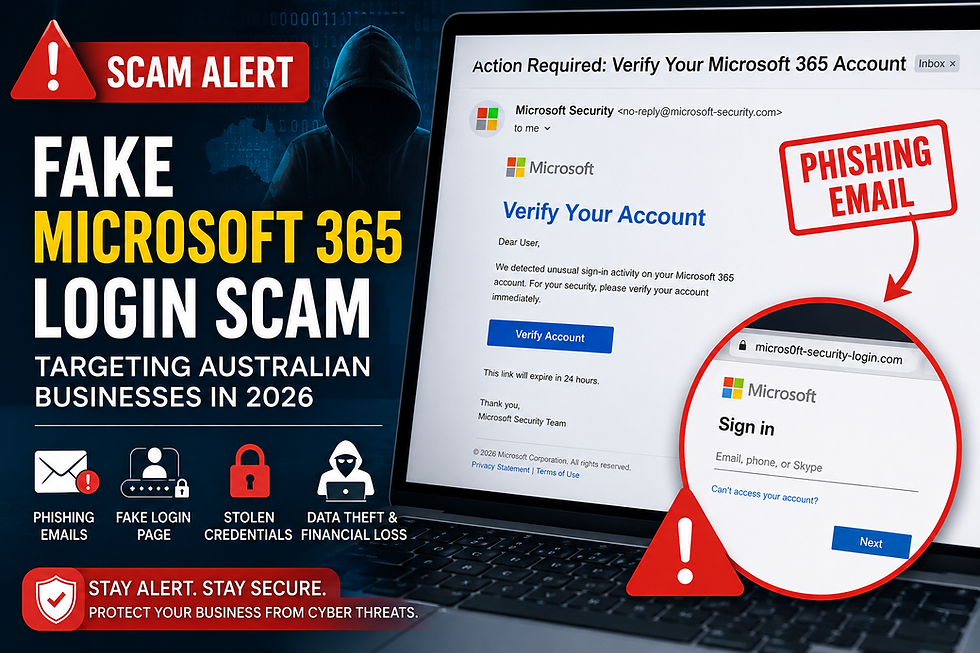
What Is the Fake Microsoft 365 Login Scam?
The Fake Microsoft 365 Login Scam is a phishing attack where hackers create fake Microsoft login websites to steal usernames and passwords.
The attack usually starts with a fake email.
The email may look like it came from Microsoft and may say:
“Your password will expire soon”
“Suspicious login detected”
“Verify your account now”
“Important security update”
The message is designed to scare users so they quickly click the link.
Once the victim enters their login details on the fake website, the information goes directly to the hackers.
Hackers can then:
access company emails
steal business files
send fake emails from the account
steal customer information
attack other employees
install malware or ransomware
How the Fake Microsoft 365 Login Scam Works
The scam normally works in a few simple steps.
Step 1 — Fake Email
Hackers send a phishing email pretending to be Microsoft.
The email may contain:
company logos
security alerts
fake invoices
urgent messages
Step 2 — Fake Login Page
When the user clicks the link, they are taken to a fake Microsoft 365 login page.
The website often looks very similar to the real Microsoft login page.
Step 3 — Stolen Password
The victim enters:
email address
password
sometimes MFA code
The login details are then stolen by hackers.
Step 4 — Business Account Access
Hackers use the stolen account to:
read emails
steal documents
target customers
send scam emails
perform financial fraud
Sometimes businesses do not notice the attack for days or even weeks.
Why Australian Businesses Are Being Targeted
Australian businesses are becoming popular targets because many companies use cloud-based systems like Microsoft 365.
Small and medium businesses are often easier to attack because they may:
have weak passwords
lack cybersecurity teams
not train employees properly
use old security settings
Hackers know that one stolen Microsoft 365 account can give them access to important company information.
Industries often targeted include:
healthcare
finance
education
logistics
legal services
IT companies
Signs of a Fake Microsoft 365 Login Page
Employees should learn how to identify phishing attacks.
Suspicious Website Address
Always check the website URL carefully.
Fake websites may contain:
spelling mistakes
extra words
unusual domains
Example:
instead of:
Urgent Messages
Hackers try to create panic using messages like:
“Immediate action required”
“Account blocked”
“Verify now”
These messages push users to act quickly without thinking.
Unexpected Emails
Be careful if you receive:
random password reset emails
unknown file sharing links
strange login warnings
Especially if you were not expecting them.
Poor Grammar or Strange Formatting
Some phishing emails still contain:
spelling mistakes
broken English
strange formatting
However, modern AI tools are making phishing emails much more realistic.
How AI Is Helping Cybercriminals
Hackers are now using artificial intelligence to create better phishing attacks.
AI can help attackers:
write realistic emails
create fake conversations
copy business writing styles
make scams look professional
Because of AI, phishing attacks are becoming harder to detect in 2026.
How to Protect Your Business From Microsoft 365 Phishing Attacks
Businesses should take cybersecurity seriously and follow basic protection steps.
Enable Multi-Factor Authentication (MFA)
MFA adds extra security to accounts.
Even if hackers steal the password, MFA can help stop unauthorized access.
Train Employees
Employees should learn:
how phishing scams work
how to identify fake emails
how to report suspicious links
why they should avoid unknown attachments
Employee awareness is one of the best cybersecurity defenses.
Use Strong Passwords
Businesses should use:
strong passwords
password managers
unique passwords
regular password updates
Weak passwords make hacking easier.
Monitor Account Activity
Companies should regularly check:
unusual logins
failed login attempts
suspicious email activity
unknown devices
This helps detect attacks early.
Keep Security Systems Updated
Businesses should keep:
antivirus software updated
spam filters active
systems patched
devices secure
Old software can contain security vulnerabilities.
What To Do If Your Account Is Hacked
If you think your Microsoft 365 account has been hacked, act quickly.
Important Steps
Change the password immediately
Enable MFA
Log out from all devices
Check for suspicious emails
Scan devices for malware
Inform the IT team
Monitor business accounts carefully
Quick action can reduce damage from phishing attacks.
Why Cybersecurity Awareness Is Important in 2026
Cyber attacks are increasing every year.
Hackers are not only targeting large companies anymore. Small businesses are also major targets because they usually have weaker cybersecurity protection.
One successful phishing attack can cause:
financial loss
stolen customer data
business downtime
ransomware attacks
reputation damage
This is why cybersecurity awareness is now essential for every business.
How Rockfort Global Can Help Protect Your Business
At Rockfort Global, we help Australian businesses stay protected from cyber threats like phishing attacks, ransomware, malware, and Fake Microsoft 365 Login Scam attacks.
Our cybersecurity services include:
Microsoft 365 security protection
phishing protection
email security
multi-factor authentication setup
endpoint protection
employee cybersecurity training
managed security services
We help businesses improve security, protect important data, and reduce the risk of cyber attacks.
As cyber threats continue growing in 2026, strong cybersecurity protection is more important than ever.
Final Thoughts
The Fake Microsoft 365 Login Scam is a serious cyber threat affecting Australian businesses in 2026.
Hackers are using fake login pages, phishing emails, and AI-powered scams to steal Microsoft 365 accounts and business data.
Businesses should stay alert, train employees, use strong security settings, and take cybersecurity seriously.
Simple security steps can help prevent major cyber attacks and protect important business information.


Comments