
Top 10 Cyber Security Mistakes Small Businesses Make in 2026


Cyber security mistakes small businesses make can lead to serious financial losses, damaged reputations, operational disruptions, and even legal complications. In 2026, cybercriminals are increasingly targeting small businesses because they often have fewer security resources than larger organisations.
Many business owners assume hackers only focus on large corporations, but the reality is very different. Small businesses are now among the most attractive targets because attackers know that many organisations still overlook basic security measures.
Understanding the cyber security mistakes small businesses make is the first step towards protecting your business, employees, customers, and sensitive data.
In this guide, we'll explore the most common mistakes and explain how your business can avoid them.
Why Small Businesses Are Prime Targets for Cyber Attacks
Many small business owners believe their company is too small to attract cybercriminals. Unfortunately, that mindset can create dangerous vulnerabilities.
Attackers know that small businesses often:
Have limited IT resources
Lack dedicated cyber security teams
Use outdated software
Provide minimal employee security training
Have weaker security policies
As cyber threats continue to evolve, avoiding the cyber security mistakes small businesses make has become essential for long-term business success.
1. Using Weak Passwords
One of the biggest cyber security mistakes small businesses make is relying on weak passwords. Employees frequently choose passwords that are easy to remember but also easy for attackers to guess.
Examples include:
Password123
Welcome123
CompanyName2026
Admin123
Cybercriminals use automated tools that can test thousands of password combinations within seconds.
How to Avoid It
Businesses should require:
Passwords with at least 12 characters
Uppercase and lowercase letters
Numbers and symbols
Unique passwords for every account
A password manager can also help employees create and store strong credentials securely.
2. Not Enabling Multi-Factor Authentication (MFA)
Another major cyber security mistake small businesses make is failing to enable Multi-Factor Authentication.
Even if a password is stolen, MFA adds an extra layer of protection by requiring users to verify their identity through:
Authentication apps
SMS verification codes
Security keys
Biometric verification
Without MFA, a compromised password can quickly lead to a full account takeover.
How to Avoid It
Enable MFA for:
Microsoft 365 accounts
Email accounts
Financial systems
Cloud platforms
Administrative accounts
This simple step can dramatically reduce security risks.
3. Ignoring Software Updates
Many businesses postpone software updates because they worry about downtime or compatibility issues.
Unfortunately, outdated software remains one of the easiest ways for attackers to gain access to business systems.
Cybercriminals constantly search for known vulnerabilities in:
Operating systems
Web browsers
Business applications
Firewalls
Network devices
How to Avoid It
Create a patch management strategy that includes:
Automatic updates where possible
Regular software reviews
Scheduled maintenance windows
Replacement of unsupported software
Keeping systems updated is one of the simplest ways to strengthen security.
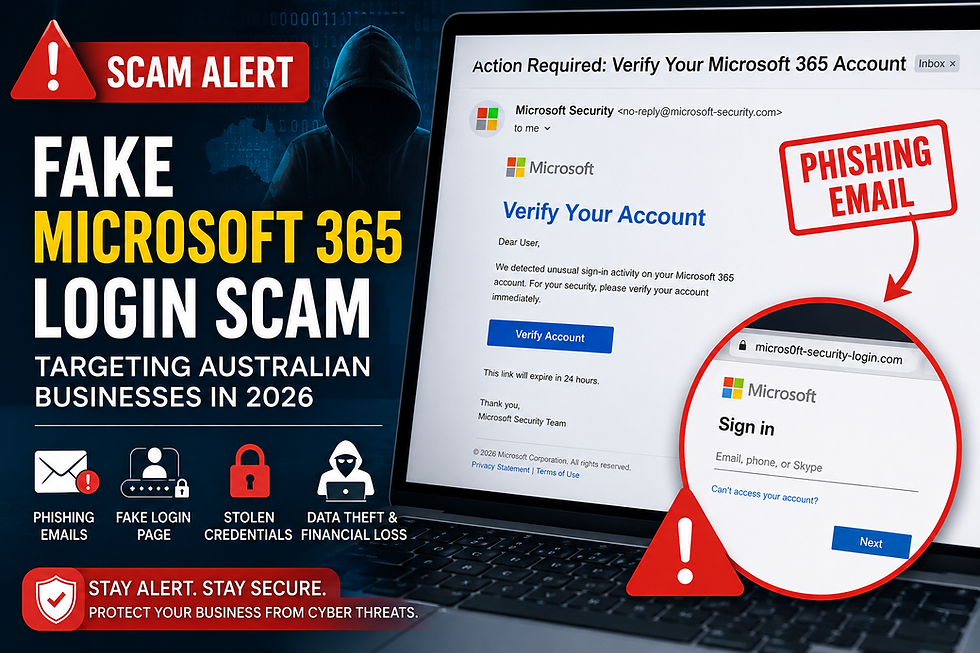
4. Falling for Phishing Emails
Phishing attacks remain one of the most successful cyber threats in 2026.
Attackers create convincing emails that appear to come from trusted organisations. These messages often encourage employees to:
Click malicious links
Download infected attachments
Share passwords
Transfer funds
A single phishing email can result in a serious data breach.
How to Avoid It
Businesses should:
Train employees regularly
Use advanced email filtering
Verify suspicious requests
Encourage staff to report suspicious emails
Employee awareness plays a critical role in preventing phishing attacks.
5. Failing to Back Up Critical Data
Data loss can occur because of ransomware, accidental deletion, hardware failures, or natural disasters.
One of the most expensive cyber security mistakes small businesses make is assuming that data backups are unnecessary until a problem occurs.
Without reliable backups, businesses may lose:
Customer records
Financial data
Operational documents
Contracts
Business-critical databases
How to Avoid It
Follow the 3-2-1 backup rule:
Keep three copies of data
Use two different storage methods
Store one backup offsite or in the cloud
Regular backup testing is equally important.
6. Giving Employees Too Much Access
Many organisations provide employees with unnecessary access to files, systems, and applications.
If an employee account is compromised, attackers can gain access to far more information than they should.
How to Avoid It
Apply the Principle of Least Privilege.
Employees should only have access to:
The files they need
Relevant applications
Necessary business systems
Conduct regular permission reviews to minimise risk.
7. Neglecting Endpoint Security
Modern businesses rely on multiple devices every day.
These include:
Desktop computers
Laptops
Smartphones
Tablets
Remote workstations
Every connected device creates a potential entry point for cybercriminals.
How to Avoid It
Implement endpoint protection solutions that provide:
Antivirus protection
Threat detection
Device monitoring
Malware prevention
Strong endpoint security helps protect both office and remote environments.
8. Not Securing Remote Work Environments
Remote and hybrid work models continue to grow across Australia.
Unfortunately, many businesses fail to secure employees working outside the office.
Common risks include:
Public Wi-Fi networks
Personal devices
Unsecured home networks
Weak passwords
How to Avoid It
Businesses should:
Require VPN usage
Enable MFA
Secure company devices
Provide remote security training
Remote workers must follow the same security standards as office-based employees.
9. Treating Cyber Security as an IT Problem Only
One of the most overlooked cyber security mistakes small businesses make is believing security is solely the responsibility of the IT department.
In reality, every employee contributes to cyber security.
Daily actions such as opening emails, downloading files, and sharing information all impact security.
How to Avoid It
Build a cyber security culture by:
Conducting regular training
Establishing clear policies
Encouraging reporting
Promoting accountability
When everyone participates, security becomes significantly stronger.
10. Not Having a Cyber Incident Response Plan
No security strategy is perfect. Even well-protected businesses can experience security incidents.
Without a response plan, confusion and delays can make the situation much worse.
How to Avoid It
Create an incident response plan that includes:
Emergency contacts
Roles and responsibilities
Communication procedures
Recovery processes
Regular testing ensures your team knows exactly what to do during an emergency.
How to Avoid the Cyber Security Mistakes Small Businesses Make
Avoiding the cyber security mistakes small businesses make doesn't require a massive budget. In most cases, improving security comes down to implementing best practices consistently.
Businesses should focus on:
Strong passwords
Multi-Factor Authentication
Employee training
Software updates
Data backups
Endpoint protection
Security monitoring
Incident response planning
Taking proactive action today can prevent significant problems tomorrow.
How Rockfort Global Can Help Protect Your Business
Avoiding the cyber security mistakes small businesses make requires more than just good intentions. As cyber threats continue to evolve, businesses need reliable security solutions, proactive monitoring, and expert guidance to stay protected.
At Rockfort Global, we help businesses strengthen their cyber security through comprehensive security assessments, Microsoft 365 security solutions, cloud security,
managed IT services, data backup solutions, and ongoing threat monitoring.
Whether you're looking to improve your existing security measures or build a complete cyber security strategy from the ground up, our team can help identify vulnerabilities and implement practical solutions tailored to your business needs.
By partnering with Rockfort Global, you can focus on growing your business while we help protect your systems, data, and customers from modern cyber threats.
Final Thoughts
The cyber security mistakes small businesses make often seem small at first, but they can have major consequences when exploited by cybercriminals.
From weak passwords and phishing attacks to poor backup strategies and inadequate employee training, every vulnerability creates an opportunity for attackers.
The good news is that most cyber threats can be prevented through proper planning, employee awareness, and modern security practices.
By addressing these common cyber security mistakes small businesses make, organisations can reduce risk, improve resilience, and protect their valuable data.
As cyber threats continue to evolve in 2026, businesses that invest in security today will be far better prepared for the challenges of tomorrow.


Comments