
Cyber Security for Small Business: Latest Threats Targeting MSMEs in 2026

Updated: Jun 8
Today, every business is online. Even small shops, coaching centers, and startups rely on computers, mobile phones, and the internet for daily operations.
Because of this, cyber security for small business has become more important than ever. But here is the problem: cyber attacks are increasing rapidly, and small businesses are now the biggest target. Previously, hackers focused on large corporations. Now, they target small businesses because they are easier to hack. Most small businesses lack strong security systems, making them prime targets.
If you run a small business, you must ask yourself: “Is my business really safe?”
What is an MSME?
MSME stands for Micro, Small, and Medium Enterprises. This includes:
Local shops
Computer institutes
Coaching centers
Small offices
Startups
These businesses often do not have robust security systems. That is why hackers find them appealing.
Why Hackers Target Small Businesses
There are three main reasons:
1. Low Security
Most small businesses do not use:
Antivirus software
Firewalls
Data protection tools
This lack of protection makes hacking very easy.
2. Lack of Awareness
Many business owners are unaware of:
Phishing
Malware
How hacking works
As a result, they may click on harmful links or install unsafe software.
3. Easy Money
Hackers know that:
Small businesses cannot afford downtime
They will pay quickly to recover data
This makes small businesses attractive targets for fast profits.
Latest Cyber Security Threats in 2026
Let’s explore the most dangerous new threats.
1. AI-Based Cyber Attacks
Hackers are now using AI tools. These tools can:
Identify security weaknesses
Send fake emails
Hack systems faster
Even beginner hackers can perform advanced attacks. In simple terms: Hacking has become faster and smarter.
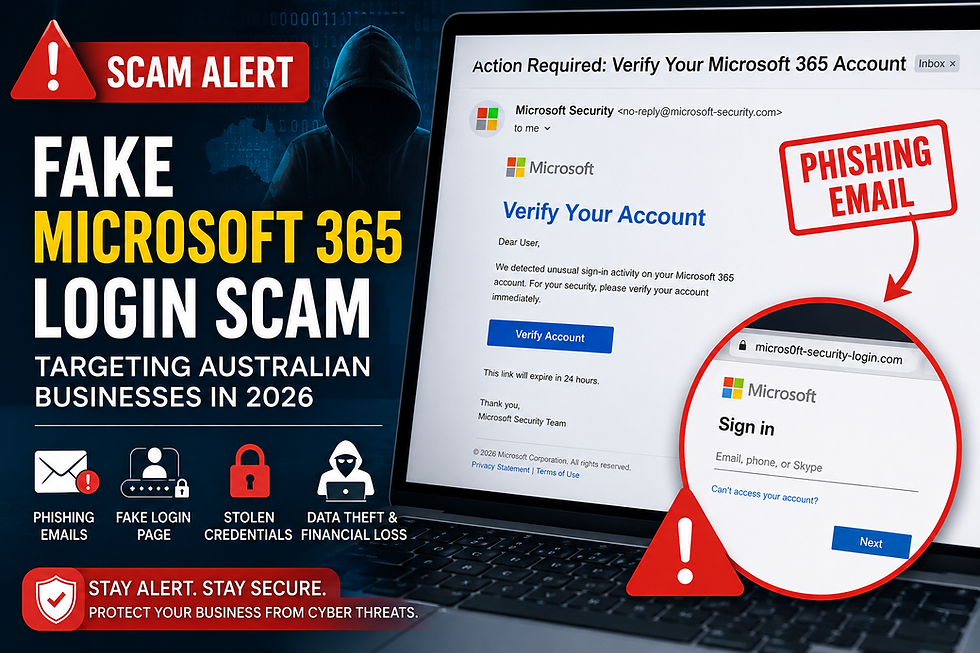
2. Phishing Attacks
Phishing is very common. You may receive:
Fake emails
Fake WhatsApp messages
Fake login pages
For example, you might get an email saying: “Your bank account will be blocked. Click here.” If you click, your data could be stolen.
3. Ransomware Attacks
Ransomware is extremely dangerous. In a ransomware attack:
Your data gets locked
You cannot access your files
The hacker demands payment
If you don’t pay, your data may be lost forever.
4. WiFi & Router Hacking
Your office WiFi can also be hacked. If your router is not secure:
Hackers can access your system
They can steal data
They can control your network
Even CCTV cameras and smart devices can be exploited for hacking.
5. Fake Software & Updates
Sometimes, you may install software from unknown websites. That software could contain:
Viruses
Spyware
Malware
Even fake updates can compromise your system.
What Happens After a Cyber Attack?
Many business owners think, “Nothing will happen to me.” But when an attack occurs, the damage can be severe.
1. Data Loss
Customer data may be gone
Important files could be deleted
No backup means no recovery
2. Financial Loss
Money may be stolen
Business operations could stop
Recovery costs can be high
3. Loss of Trust
Customers will lose trust if their data is leaked.
4. Business Shutdown
In many cases, small businesses close after a cyber attack.
How to Protect Your Business
Now for the important part — the solution. You don’t need extensive knowledge. Just follow these simple steps.
1. Use Strong Passwords
Create long passwords
Avoid using the same password everywhere
Change passwords regularly
2. Install Antivirus Software
Always use a reliable antivirus. It protects against:
Viruses
Malware
Suspicious files
3. Secure Your WiFi
Change the default password
Use strong encryption
Avoid sharing WiFi with unknown individuals
4. Backup Your Data
Always keep backups:
On the cloud
On an external drive
If data is lost, you can recover easily.
5. Train Your Staff
Educate your team on basic security practices:
Do not click unknown links
Avoid downloading random files
Verify emails before opening
6. Update Software Regularly
Updates fix security issues. Always:
Update your operating system
Update your applications
Update your antivirus software
7. Conduct a Cyber Security Audit
This is crucial. A cyber security expert can:
Assess your system
Identify weak points
Suggest improvements
Why Cyber Security for Small Business is Important in 2026
Cyber security is no longer optional. It is a necessity. If your business is online, you are already a target. A small investment in security can save you from significant losses.
Final Thoughts
Cyber attacks are growing every day. And the truth is: Small businesses are the easiest target. Don’t wait for an attack to happen.
Take action now:
Secure your systems
Protect your data
Train your team
Once data is lost, recovery is often difficult.
Conclusion: The Path Forward
In today’s digital landscape, the stakes are high. Cyber threats are evolving. You must stay ahead.
Invest in robust cybersecurity measures. Partner with experts who understand your needs. With the right strategies, you can safeguard your business.
Remember, your security is your responsibility. Don’t leave it to chance. Take control of your cyber destiny today.


Comments